
Bring your TV Time history to Moviebase
TV Time shut down on July 15, 2026. If you saved your export, Moviebase imports the ZIP or CSV file directly on iPhone and Android. No Trakt account needed.


Free to download, with optional Premium.
You need an export you saved earlier
TV Time no longer provides new exports. Check your Downloads folder, cloud storage, email attachments and device backups for a ZIP archive or extracted CSV files.
What comes across
Watched episodes
Your progress for the shows in your file.
Watched movies
The films you marked as watched.
Watchlist entries
The shows and movies you saved for later.
Moviebase imports the supported watched episodes, movies and watchlist entries in your file. What transfers depends on what your file contains and on title matching, so review the result after importing.
How to import your TV Time export
- 1
Find your saved export
Locate your TV Time ZIP or CSV file. Keep the original and import a copy.
- 2
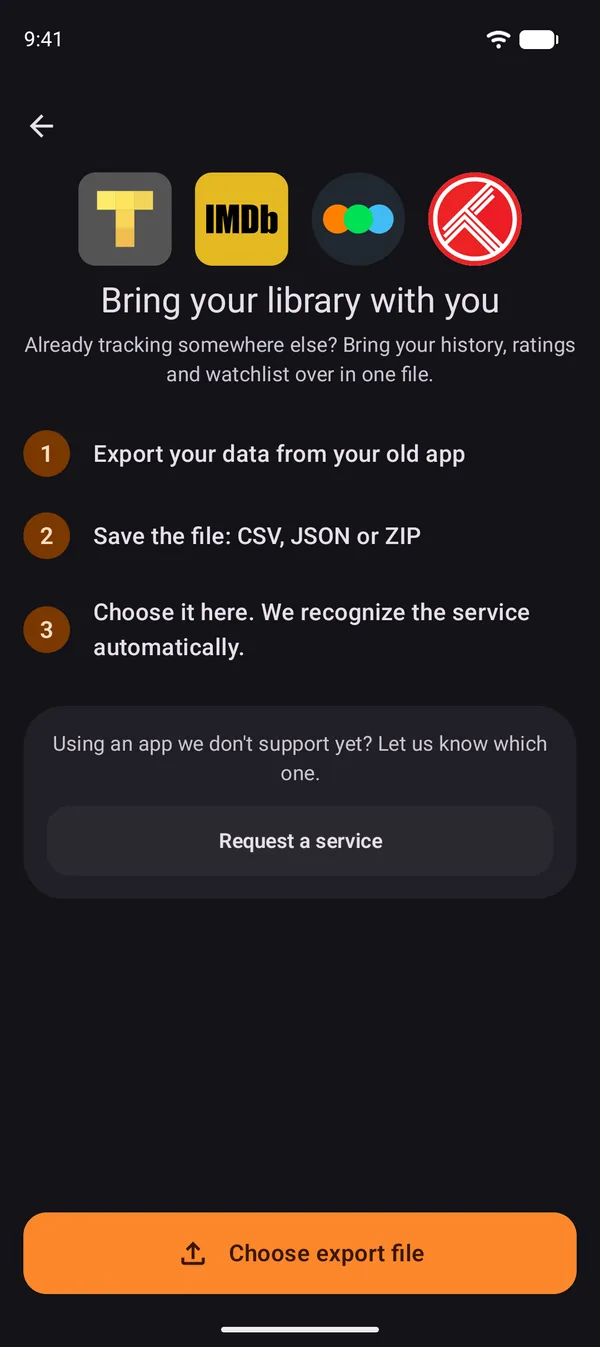
Open Import data in Moviebase
Go to Settings and tap Import data under Data. If you don't see it, update Moviebase to the latest version.
- 3
Choose your file
Tap Choose export file and pick your saved ZIP or CSV. Moviebase recognizes the TV Time file on its own.
- 4
Review your progress
Keep Moviebase open while it imports. When it says your library is ready, check a few shows and movies you remember and add anything that is missing.
No export, or already on Trakt?
Your history is already in Trakt
Connect your Trakt account in Moviebase instead. You do not need to import the same TV Time file again.
Trakt sync guideYou do not have an export
Moviebase cannot recover history from a closed TV Time account. Add your current shows and mark the episodes you have already watched.
Read about saved TV Time exportsTV Time import questions
- Can I still export my data from TV Time?
- No. TV Time shut down on July 15, 2026 and no longer provides new exports. Only a file you saved before the shutdown can be imported.
- Do I need a Trakt account to import?
- No. Moviebase imports a saved TV Time ZIP or CSV file directly. Trakt is an optional connection.
- What if some titles are missing after the import?
- What transfers depends on your file and on title matching. Review the result, add missing progress manually and keep your original file.
- Is Moviebase free?
- Moviebase is free to download on iPhone and Android, with optional Premium. Ad removal is a Premium benefit.
More about the TV Time shutdown
How to Switch from TV Time to Moviebase
Bring a saved TV Time export into Moviebase, connect existing Trakt history, or rebuild your progress after the shutdown.
TV Time Exports After the Shutdown: What You Can Still Do
Find a previously saved TV Time export, understand your import options, and continue tracking in Moviebase.
TV Time Shut Down on July 15, 2026: What You Can Do Now
TV Time shut down on July 15, 2026. Learn what happened, how to use a previously saved export, and which movie and TV trackers can replace it.
What Happens to Your TV Time Data After the Shutdown
TV Time shut down after July 15, 2026. Learn what happened to account data, how to use a saved export, and how to continue tracking.
Best TV Time Alternatives in 2026
Choose a replacement for community reactions, TV reviews, episode progress or a saved viewing history.
Moviebase vs TV Time
Moviebase vs TV Time: compare publisher screenshots, tracking features and saved-export options after TV Time’s closure.
Pick up where TV Time left off
Import your file, keep your watchlist and never miss the next episode.